
Help desk impersonation is one of the easiest social-engineering plays running right now. Spoofed emails, look-alike Teams accounts, "urgent" calls from "IT support": several of the most expensive breaches in recent memory started this way.
Email guardrails and awareness training catch a lot. But there's a gap on the receiving end. When IT contacts a user, the user has no reliable way to answer the only question that matters:
Is this actually IT, or is this someone pretending to be IT?
A badge in a signature proves nothing. A familiar name proves nothing. A phone number is trivial to spoof.
I wanted something that worked like the Uber rider/driver PIN, a short code that proves the agent and the user are connected through a channel an attacker can't impersonate.
I ended up building it in a day using only what was already sitting in the tenant. Copilot Studio, Power Automate, Teams, SharePoint, Entra ID. Net new cost: zero.
The Idea
When an IT agent reaches out to a user, they trigger a small bot in Teams. The bot:
- Asks for the user's email and a ticket reference.
- Generates a 6-digit code.
- Sends that code to the user from a trusted, branded Teams channel.
- Shows the same code back to the agent.
The agent reads the code aloud. The user compares. Match → trust. No match (or no message at all) → not real IT.
"No code, no trust."
How It Actually Flows
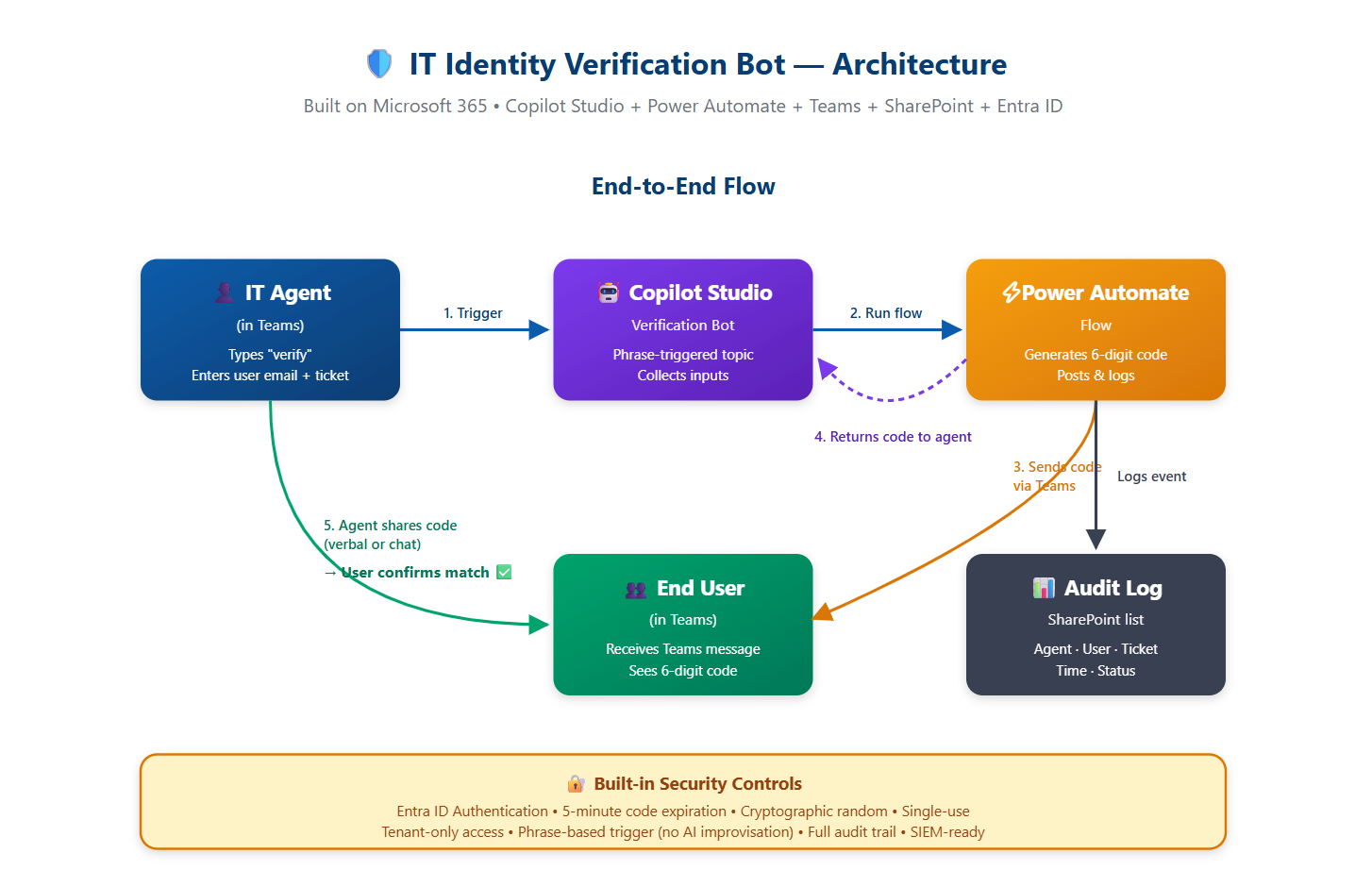
Five parts, all already in the tenant: Copilot Studio, Power Automate, Teams, SharePoint, Entra ID.
The Insight That Made It Click: The Bot Is the Trust Anchor
The question I got most often was: why not just DM or call them from Teams?
The answer turned out to be the most important idea in the whole project.
The bot isn't a verification tool. It's a trust anchor.
A Teams DM proves nothing: accounts get compromised, display names lie, and one phished insider can now DM anyone as a "trusted internal user." A phone call proves even less: caller ID is spoofable, voices can be deepfaked, no audit trail.
The bot has properties none of those have:
- A single, branded, well-known source. Exactly one Tech Verify bot in the tenant. Anything else claiming to be IT is automatically suspicious.
- Tied to authenticated identity. Only real, MFA'd employees can trigger it. Agent identity is pulled from Entra ID; no typed-in name to lie in.
- Challengeable. This is the part I underestimated. The user can demand the bot fires. "Before we continue, send me a code." Real IT can. Imposters can't. The user holds the trigger, not the agent.
- Audit-logged. Every legitimate contact becomes a queryable event.
Most security tools verify the message. This one verifies the channel. The presence of a bot message is the proof; the code just binds that proof to a specific user, agent, and moment.
The user mental model becomes one sentence:
Anyone claiming to be IT should be able to send you a code from the Tech Verify bot. You can demand it at any point. Real IT can fire the bot. Imposters cannot.
That's the entire user training.
Why Copilot Studio Over a Custom SDK Bot
I originally scoped this as a full Bot Framework SDK build: Azure Bot registration, secret rotation, hosting, CI/CD pipeline, weeks of work.
Copilot Studio gave me a low-code conversation builder, native Teams + Entra integration with zero auth code, Microsoft-hosted runtime, and Power Automate for the heavy lifting. For an internal security MVP, it was the right call. If usage grows or we need richer UX, porting to the SDK is a clear future move and the core logic stays the same.
Three design choices I'd keep regardless of stack:
- No links, no buttons, no attachments in the user message. Anything fancy is what phishers send. The plainness is the brand signal.
- Ticket reference in the user message. Users cross-check against the ticket they actually opened.
- Agent identity auto-pulled from Entra. One less field to lie in.
The Bug That Taught Me the Most
The build was 90 minutes. Debugging was four hours, and one bug taught me everything.
Every test sent two messages with two different codes. First guess: Power Automate retries. I set retry policy to None on the trigger and the Teams post. Helped, but didn't fix it.
The second message kept arriving, but now I noticed it was formatted differently from the first. Polished adaptive card, bold timestamps, emoji I'd never written. Retries produce identical messages. Two different formats meant something was generating a second response from scratch.
The culprit: generative orchestration. Copilot Studio's "agent chooses" trigger uses an AI layer that doesn't just route to topics, it can generate its own embellished responses on top of yours. It saw "a code was sent" and helpfully rewrote it as a prettier card. With a hallucinated different code.
For a chatbot, that's a feature. For a security tool, it's catastrophic. The "second code" wasn't real: the AI was inventing one to fit the pattern.
The fix: switch the topic trigger from "The agent chooses" to "User says a phrase," and lock the bot to deterministic phrases. No AI in the path. Same input → same output, every time.
What I'd Hand Anyone Building a Security Bot on This Stack
- Phrase-based triggers, never generative orchestration. A bot that improvises cannot be audited.
- Disable retry policies on action-producing steps. A retry on "send a code" is a second event, not a recovery.
- Validate in the real channel, not the test pane. They behave differently.
- Pull identity from the platform, never user input.
System.User.DisplayNameis tamper-resistant. A text field isn't. - Keep user-facing messages deliberately plain. Plainness is the signal.
- Hash sensitive values in your audit log. SHA-256 is one Compose action away.
Takeaway
The gap between "this would be a great control to have" and "this is running in production" was one day. One person. Zero new vendors.
Most tenants are already packed with the building blocks. The skill isn't building the components; it's spotting the seam where they fit together to solve a real problem, and being honest about what the resulting tool actually does.
In this case, the bot isn't proving who someone is. It's giving users a single, controlled channel where the question "is this real IT?" has a binary, observable answer. That's worth more than any awareness slide deck.
Resources
Microsoft 365 & Copilot Studio:
- Copilot Studio Documentation - Building conversational agents in Microsoft 365
- Power Automate Documentation - Workflow automation and integration
- Microsoft Entra ID - Identity and access management
Security Patterns & Social Engineering:
- NIST Phishing Guidance - National Institute of Standards and Technology resources
- Understanding Vishing & Help Desk Impersonation - CISA guidance on social engineering
- Verification Codes for Trusted Channels - The Uber PIN model that inspired this approach
The most important lesson: The channel is the proof. Not the message, not the credential, not the name. The channel.
Build something that gives people a single, trusted place to verify. Then train them that anything outside that channel is suspect. Everything else is just implementation detail.