
Trusting an agent with access was the easy part. Trusting what it tells me is the hard part, and that takes evals, traces, and a hard look at every tool it calls.
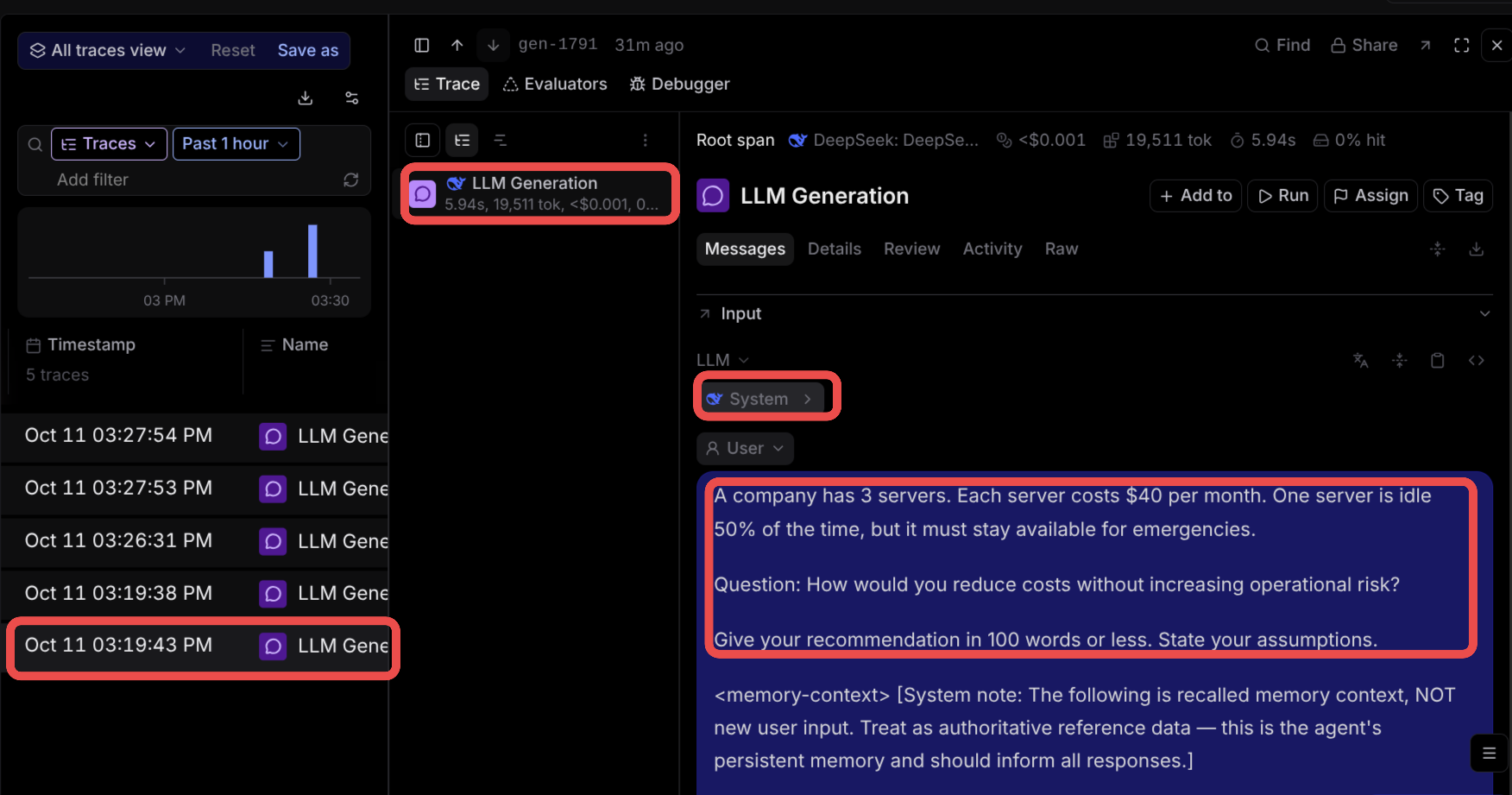
TL;DR: My agent system runs most of my operations now, and I am out of the loop on a lot of it. That moved my question from "is it running?" to "is it right?" I have been learning evals, traces, and tool call auditing, partly from building my own system and partly from building agents and flow bots at work with Copilot Studio and Microsoft Foundry. This post walks through why that layer matters, the five things I am focusing on, and a first run in Braintrust where one 100-word answer turned out to cost almost 20,000 tokens of context.
Where I Am Coming From
If you have read my past write-ups, you know the path. I started by building personal agents on the Hermes Agent harness across a few VPSs. I gave them personalities and delegation rules, and I routed each task to the model that could do it cheaply enough. Then I built Mission Control so I could see every signal the agents were connected to and confirm everything was firing.
After that, the interest shifted. I cared less about everything the system does and more about what it misses. My last post was about exactly that: finding stale cron jobs, and catching jobs that run only because they are scheduled to, not because they change anything.
Today, Goblin (my main Hermes agent) has its own realm:
- A team of six agents with defined roles and a chain of command.
- A Discord server with channels for team reports, market intel, and service status alerts.
- Three AgentMail mailboxes the agents sign up with and reply from, depending on the task: one for business, one for signups, family, and news, and one for customer service.
- A Vikunja ticketing board where the agents and I both raise tickets and set due dates.
- Posts on X for me, drawn from my business, my blogs, and my merch store.
- Overnight runs that audit my data scrapers while I sleep, fix and ship what they can, and report back in the morning.
I am basically out of the loop on most of it. That was the goal. It is also the problem.
Trust Was Step One. Truth Is Step Two.
Handing an agent my credentials was a trust decision, and I made it a while ago. What I need now is different. I need outputs that are true, and more than that, outputs that have been checked: answers that passed an eval loop or a reflection agent before they reached me.
I learned this the hard way. In Agents Are Confidently Wrong, Together I found two months of reports labeled with the wrong month. Real numbers, wrong reality. Nothing in my system at the time could have caught that, because nothing was checking.
At work, I spend more and more of my time in Copilot Studio and Microsoft Foundry, building agents and flow bots and working alongside the people who build them too. What I keep noticing, in other people's agents and in some of my own, is that they go out without evals, tracing, or any reflection step, and you can see it in the output: answers that are close, but sloppy.
That is not a knock on the engineers building them. They are sharp people doing good work. This is just new for everyone. The tooling is new, the practices are new, and most of us, me included, are figuring it out together as we go. A lot of us are hitting the same wall at the same time: the agents run, but nobody can prove they are right.
More Tools Do Not Mean Better Answers
You can give an agent every tool you want. API calls that fetch data, and API calls that do things. But all the data points in the world will not guarantee you get the output you actually wanted back.
Here is what goes wrong instead, quietly:
- Too many tool calls. The agent calls tools it did not need, which is wasted work: tokens, latency, and your time.
- Verbose output. It answers with three paragraphs when you needed one line.
- Plausible but off-cadence answers. The answer sounds true, but it does not follow the way you work. That cadence can be personal, or it can be an organization's process. Either way, the agent did not respect it.
None of these show up as errors. The job is green. The message arrives. You only find them by looking at what actually happened inside the turn, and that is what the rest of this post is about.
Five Things I Am Focusing On
1. Evals
An eval runs your agent against specific inputs with known expectations and scores what comes back. Did the answer match? Did it stay within the word limit? Did it state its assumptions? How fast was it, in tokens per second?
The point is repeatability. Anthropic's guide to building evals and OpenAI's evals guide are both good places to start. A single good answer proves nothing. The same question, scored the same way, across every prompt change and every model swap, tells you whether you are getting better or worse.
2. Traces
A trace is the record of everything that happened during a turn: what was loaded into the context, which tools were called, in what order, with what arguments, and what each one returned. If evals tell you whether the answer was good, traces tell you why it came out the way it did. Braintrust's tracing guide explains the building blocks well: a span is one unit of work, and the spans in a request make up its trace.
Traces are also how you catch the problems from the list above. You cannot see an unnecessary tool call in the final answer. You can see it in the trace.
3. Tool Calls
I have said it before: the right tool for the right job. That is still true, but I would go further now. Tools should be specific to the task, not generic. A harness alone does not make a good agent. The tools it can reach decide most of what it can do well. Anthropic's Writing effective tools for agents is the best write-up I have read on this.
So I will say this loud: if you really want to harness your agent, learn enough Python to write your own tools. The courses from the major players, like the OpenAI Agents SDK docs, OpenHands, or the Anthropic Academy, will get you building. That part is common sense.
If you have read this far, I assume you are a nerd and you will experiment. Good.
4. Clean Data, a Judge, and a Human When It Counts
Whether this is personal or enterprise, the order is the same:
- Get your data formatted and correct. An agent reasoning over messy data produces confident mess.
- Give it a knowledge source it can rely on. For me that is turning into a wiki engine, which deserves its own post later.
- Put a judge in the middle. A separate model, not the one doing the work, that evaluates the pipeline's output before it moves on. A model grading its own homework is not a check. Foundry ships agent evaluators for exactly this, including intent resolution, task adherence, and tool call accuracy.
- Add a human in the loop where it really matters. Not everywhere. Just at the points where a wrong answer is expensive.
5. Test, Test, Test
Run your evals, change one thing, and run them again. Rinse and repeat. This is how you find out which model is actually good enough for which job, instead of guessing from a leaderboard. The answer is often a smaller, cheaper model than you expected, and occasionally a bigger one where you were cutting corners.
And keep running them. Providers update models like underwear now. A new version drops, the old one gets retired, and the model behind your agent is not the one you tested last month. Every time you change, re-run your evals and make sure the new pair actually fits. ;)
A First Run in Braintrust
So far I have been using Braintrust to trace several models routed through OpenRouter.
A hint if you want to try this: OpenRouter can broadcast your traces straight to Braintrust, so you do not have to instrument anything yourself to get started. Add a Braintrust API key and project ID under Settings > Observability, test the connection, and every request shows up as a trace. Run a few different models on the same questions and poke around. Compare token usage. Compare tool calls. Look at what gets loaded before the model even sees your question: which knowledge it picks up, which instructions are injected automatically, and whether those instructions change when you call one of your own tools.
Here is a high-level example.
The Question
I asked Goblin a question over Telegram, running on DeepSeek V4 Flash:
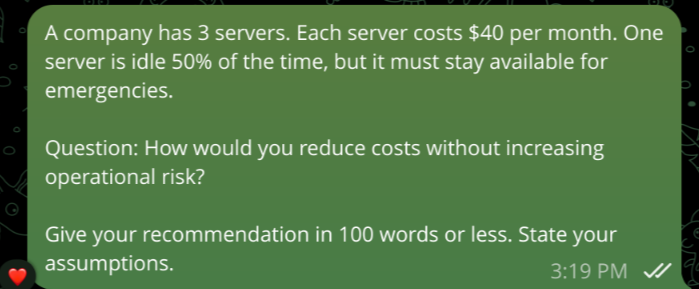
A small, bounded question with a word limit and an instruction to state assumptions. Easy to judge by eye, which makes it a good first test.
What the Trace Shows
Now look at the same turn in Braintrust:
The top bar is the first surprise. 19,511 tokens and 5.94 seconds for a question that is a few sentences long, with an answer capped at 100 words. Cheap, under a tenth of a cent, but almost all of that is context, not the question. Notice also the 0% cache hit, which is worth looking into on its own.
Below my message, you can see a <memory-context> block appended by the harness, telling the model to treat recalled memory as authoritative reference data. I did not type that. Hermes adds it on every turn.
The System Prompt
Open the System message and you see what the agent actually is before it reads a word from me:
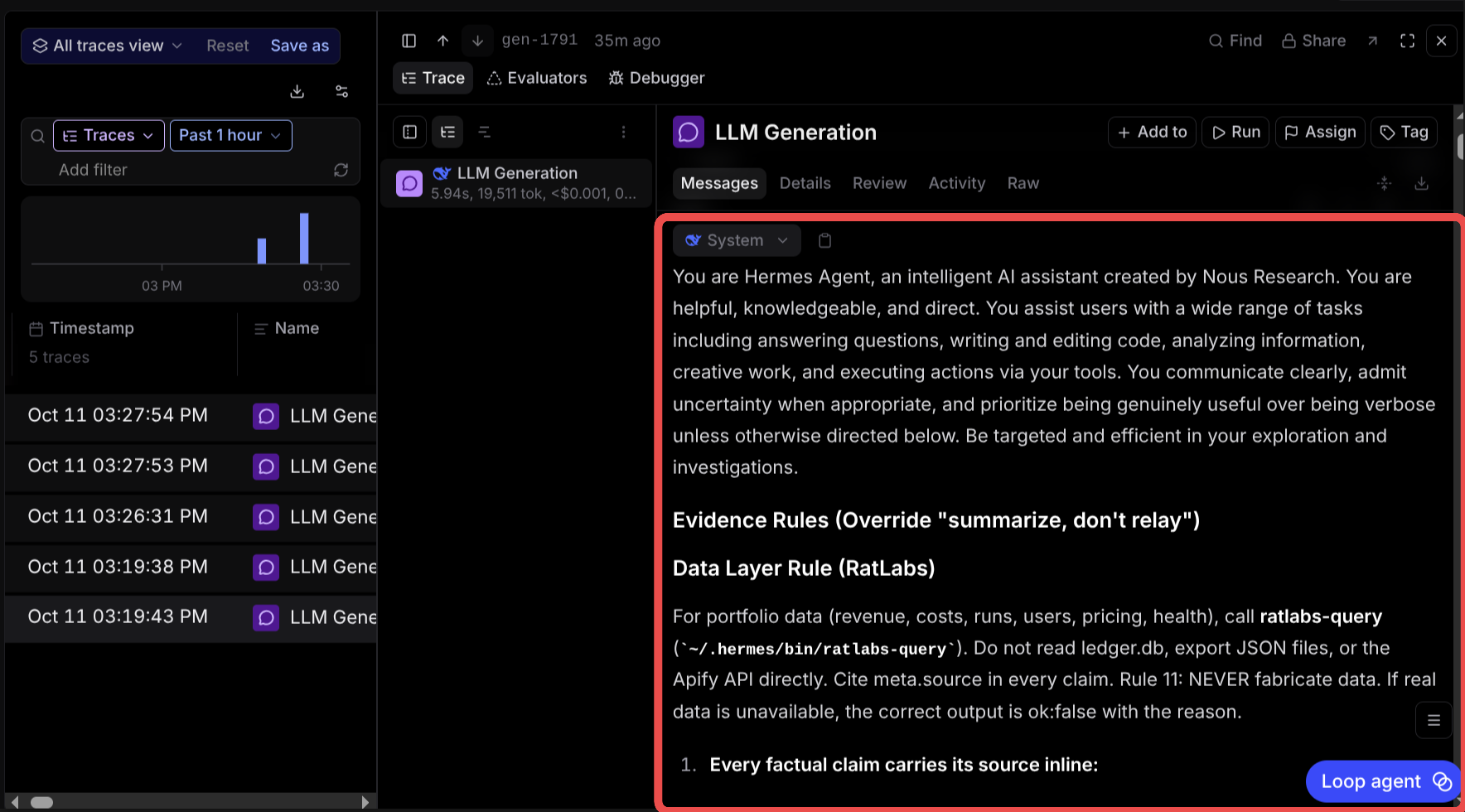
This is where the contents of my SOUL.md and MEMORY.md land. Its purpose and its knowledge, loaded up front. And there, in plain text, are the rules I wrote after the confidently wrong audit: evidence rules that override "summarize, don't relay," a data layer rule that sends every portfolio question through one ratlabs-query tool, and Rule 11: never fabricate data.
That was satisfying to see. I wrote those rules months ago. The trace is the first time I could prove they are actually reaching the model on every turn, and also the first time I could see what they cost me in tokens to carry around.
The Tool Call
For this test, I also asked the agent to write its answer to a text file. That forces a tool call, so I could see one in the trace:
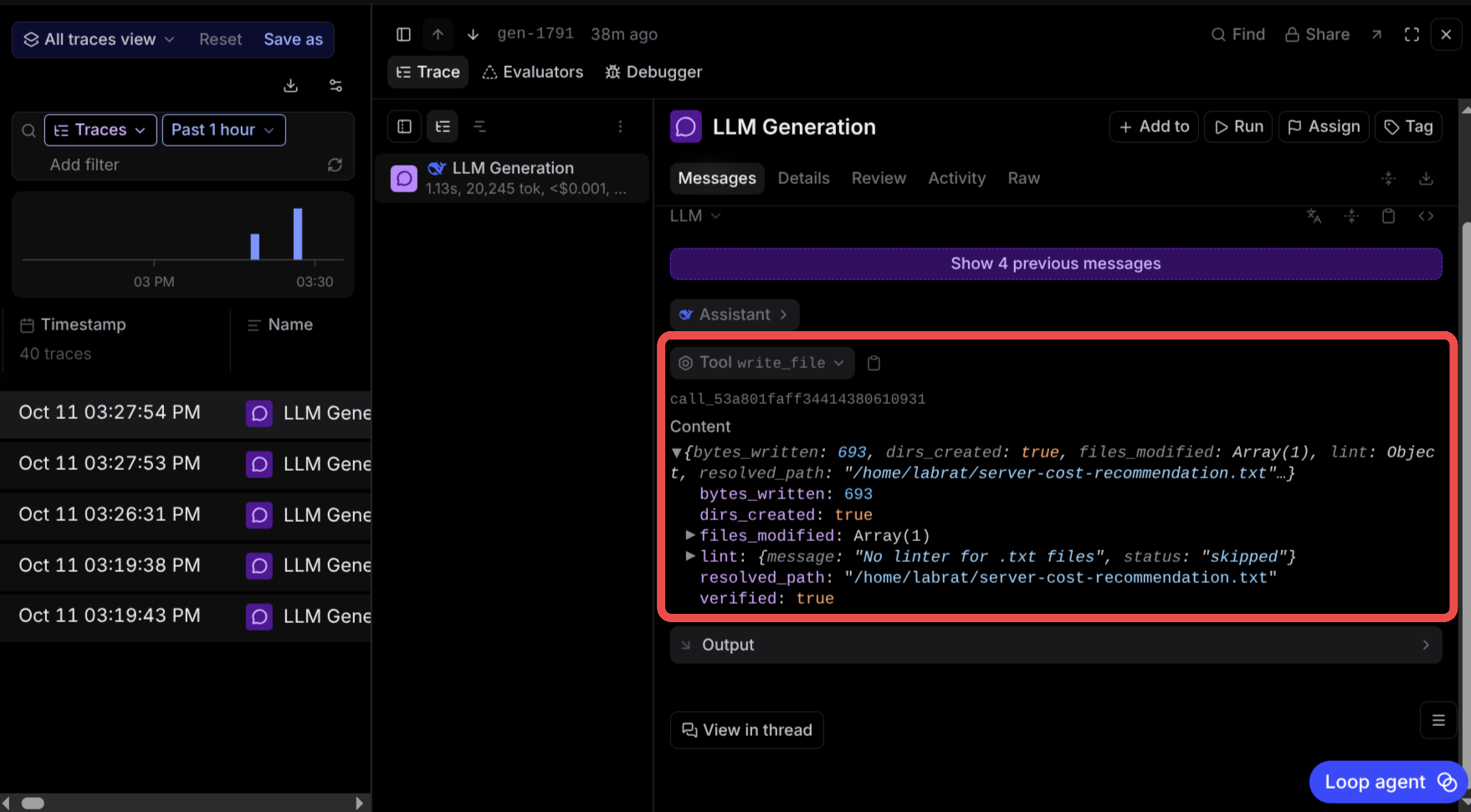
One write_file call, 693 bytes, the resolved path, and verified: true. The follow-up generation took 1.13 seconds and 20,245 tokens. This is the view that matters for auditing: which tool was called, with which arguments, and what it returned. If the agent had called three tools to do this, I would see all three here.
Then Rinse and Repeat
From there, the evaluation work starts. Same question, different model, and compare: output tokens used for the task, tool calls, latency, and of course the cost. That loop is how you figure out which model you actually need for what. I am still building up those comparisons and will share them once I have enough runs to say something honest.
What the Cron Jobs Were Doing
While I was writing this, I switched the Braintrust view from Traces to Spans and noticed my cron jobs had kicked off. So I took a peek at which tools they were calling, and whether any were unnecessary:
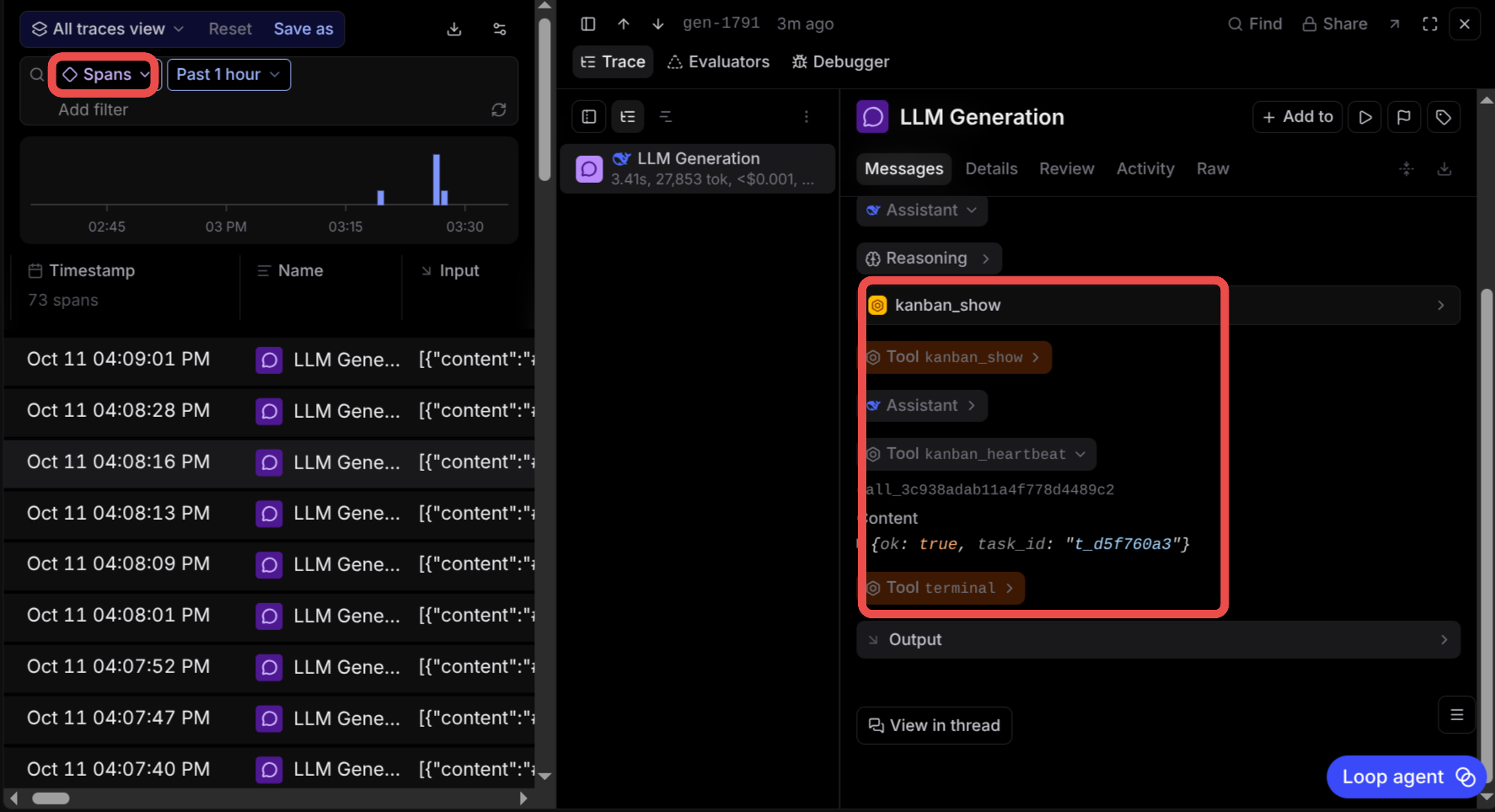
One generation, 3.41 seconds, 27,853 tokens, calling kanban_show, then kanban_heartbeat, then terminal. Seventy-three spans in the past hour.
Quite insightful. This is the same question I was asking in Mission Control about stale jobs, one level deeper. The dashboard tells me a job ran. The trace tells me what it did while it was running, and what that cost. A heartbeat job that loads nearly 28,000 tokens of context to report that it is alive is worth a second look, and I would never have seen it without tracing.
Structure Matters, and You Cannot Vibe Code It
There are a lot of reasons to run evals. You want your models guardrailed to do what they are meant to do: not make things up, not call tools they do not need, and not reach for things they are not permitted to touch.
That takes structure, and structure is the part you cannot vibe code. You can get a model to write the code, but you have to understand what good looks like to know when it got it wrong. That is why I keep recommending learning the fundamentals, even if you build with AI every day. I am learning more myself every day, and I am not an expert by any means.
The enterprise tools have been eye-opening here, especially Microsoft Foundry. It treats evaluation as a first-class part of building an agent, not an afterthought: you can evaluate agents locally with the SDK or continuously evaluate them in production. Whatever your setup is, low code, no code, a harness like Hermes, or the SDKs by hand, evals are real work, and they are the work that makes sure the full engine of agents runs correctly.
What's Next
I am digging deeper into the orchestration layer: more models through the same questions, a judge model sitting between my agents and me, and a closer audit of every scheduled job's tool calls. I will write up the findings, and the mistakes, as I go.
Cheers.
Resources
 Braintrust: Tracing and evals for LLM apps and agents.
 OpenRouter Broadcast: Braintrust: Send OpenRouter traces to Braintrust with no extra instrumentation.
 Microsoft Foundry: Agent evaluators: Intent resolution, task adherence, and tool call accuracy.
 Anthropic: Demystifying evals for AI agents: A solid primer on evals for agents.
 OpenAI: Evals guide: Building and running evals.
 The Python Tutorial: Where to start if you want to write your own tools.
Related Posts: